開源項目

我自行開發並持續維護的開源項目,每個都附有原始碼、授權條款及安裝方式。

Claude Code 外掛 · CLIApache-2.0

Better Workflows

AI coding agent 的交付關卡:不得以過期的綠燈測試宣稱完成,也不得重複或疊加結果未知的外部動作。

agent runs npm test → passes
agent edits src/sum.ts → breaks it
agent "Done. Tests pass."
bw ✗ Stop blocked. test: last result was for an older tree; files changed since then.
agent git push origin main → times out after the push landed
agent git push origin main (retry)
bw ✗ Denied. git-push: the same action already succeeded at this commit.

Agent 必須與目前的檔案狀態,以及外部服務實際執行的操作保持一致;權限只來自 agent 無法修改的 policy 檔案,不會來自提示詞。V6 Core 目前為 alpha(6.0.0-alpha.2),以 Apache-2.0 發佈、沒有執行期依賴套件,首先支援 Claude Code。

  • 測試結果綁定當下的檔案:測試通過後又修改了檔案,agent 嘗試收尾時會被攔下並退回重做。
  • 外部動作不會重複:push 逾時但其實已經成功時,針對同一個 commit 的重試會被拒絕。
  • 不使用 Claude 也能試用:以 npm 全域安裝後,幾秒內即可跑完這兩個示範情境。

安裝

claude plugin marketplace add stephen-taipei/better-workflows
claude plugin install better-workflows-core@better-workflows --scope local
bw init

Claude Code 外掛MIT

Deckhand

位於 Claude Code 輸入框上方的多 AI 工具列:查看用量、一鍵切換模型、並行派出子代理,並請其他 AI CLI 以唯讀方式提供第二意見。

Deckhand 工具列的桌面版與終端機版:用量、Sub5、外派按鈕及 Recap

終端機及桌面版 App 均支援。Claude 仍是主代理,Deckhand 只是把常用操作變成工具列上的一個按鈕。

  • 用量指標:5 小時區間、每週區間及上下文視窗,數字與 Claude App 的用量卡片一致。
  • Sub5:把任務拆成最多 5 項,各自在 git worktree 中並行處理,再由主代理審查、整合並清理。
  • 外派按鈕:以唯讀方式交給 Codex、Cursor agent 或 agy,由 Claude 審查答案,只整合站得住腳的部分。

安裝

/plugin marketplace add stephen-taipei/deckhand
/plugin install deckhand@deckhand
CLI · MCP · 瀏覽器擴充功能Apache-2.0

Intent Galaxy

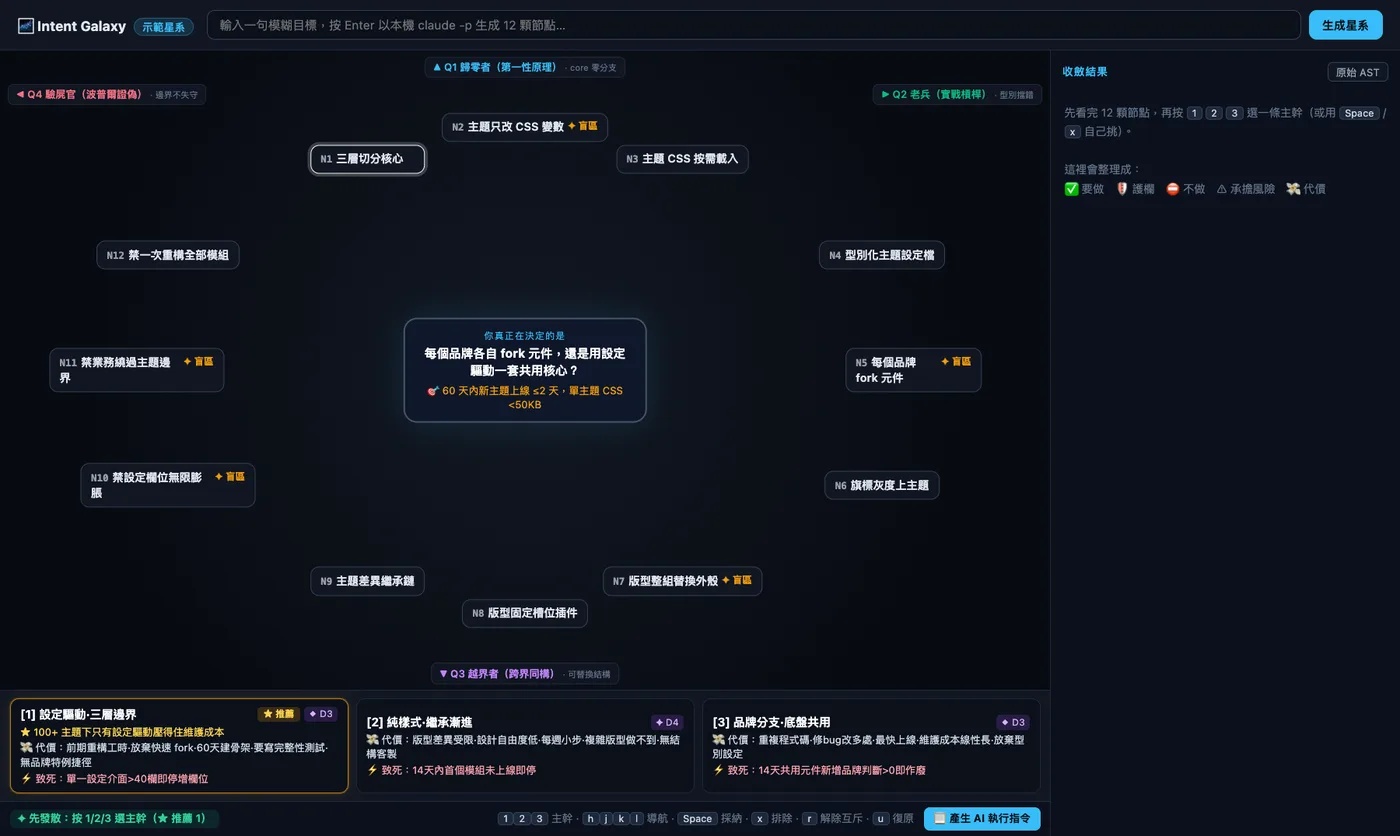
把一句模糊的目標展開成星系圖:先發散以看見盲點,再用鍵盤收斂成確定性的意圖規格。

Intent Galaxy 星系畫面:中心命題、4 個象限的 12 個節點及 3 張策略卡

AI 按「中心命題 + 4 位對立專家 + 12 個思緒節點」生成星系;收斂後由不使用 LLM 的純函數編譯器產出 LOCKED INTENT AST,直接注入 Claude Code 或 AI 網頁的輸入框。沒有任何依賴套件。

  • 三種用法:本機 CLI、MCP Server(Claude Code、Codex、Gemini CLI、agy 均可掛載),以及 Chrome / Firefox 擴充功能。
  • 可使用已登入的本機 CLI、Ollama 或多家 API 供應商生成;本機伺服器只綁定 127.0.0.1,API key 不會傳送到瀏覽器。
  • Kill-gate:鎖定時寫入 .intent.lock.json,14 天後若有 commit 觸及相關路徑,必須回報此意圖是否依然成立。

安裝

npx @stephen.taipei/intent-galaxy
claude mcp add intent-galaxy -- npx -y @stephen.taipei/intent-galaxy
CLI · 瀏覽器擴充功能Apache-2.0

Adorable Git Graph

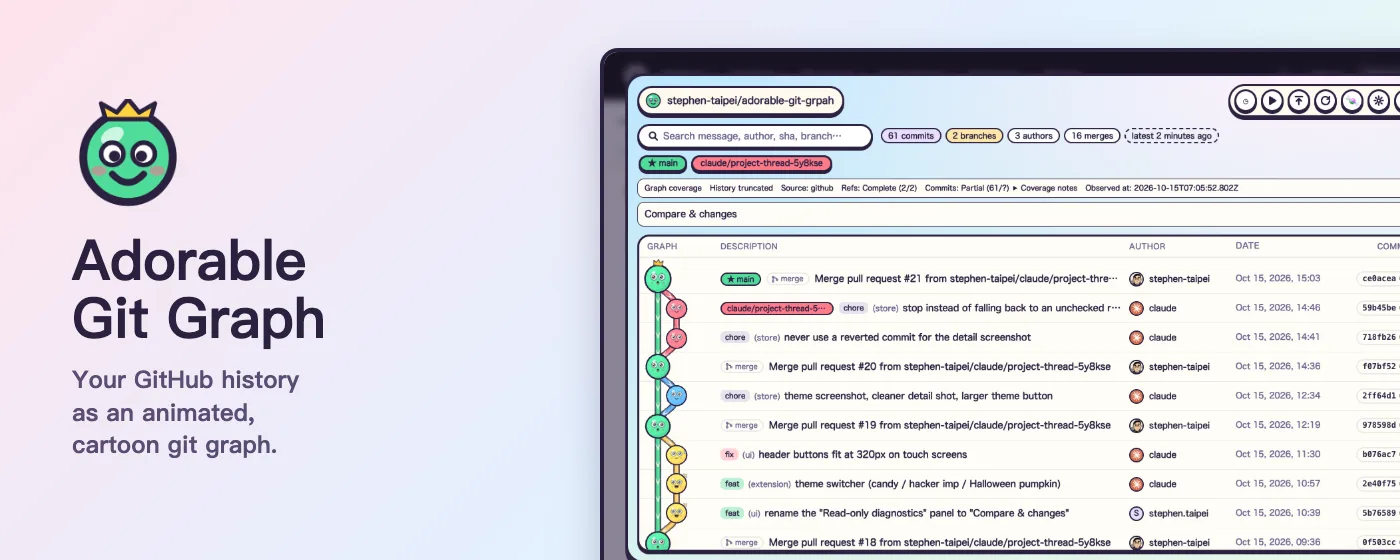
把 git 歷史畫成可以捲動的卡通:每個 commit 是一個有表情的小球,每條 branch 是流動的管線。

Adorable Git Graph 的 git graph 列表:卡通 commit 小球、branch 標籤、作者、日期及 SHA

以 three.js 繪製的 git log --graph 式列表,支援 GitHub repo 及本機 repo。全程唯讀,沒有分析、沒有追蹤,也沒有自己的伺服器。

  • 三種形式共用同一套 UI:Chrome 擴充功能、Firefox 附加元件(商店審核中,可從原始碼載入),以及用 npx 啟動的本機 CLI。
  • CLI 即時更新:在終端機 commit、切換 branch 或 fetch,新的 commit 會直接出現,無須重新整理。
  • 搜尋、branch 聚焦、commit 詳情及 base / head 比較;三種主題各有淺色與深色,介面支援 41 種語言。

安裝

npx @stephen.taipei/adorable-git-graph

其餘公開的 repo 都在 github.com/stephen-taipei