Open Source ပရောဂျက်များ

ကျွန်တော် ကိုယ်တိုင် ဖန်တီးပြီး ဆက်လက်ထိန်းသိမ်းထားသော open source ပရောဂျက်များ ဖြစ်ပြီး တစ်ခုချင်းစီတွင် source code၊ လိုင်စင်နှင့် ထည့်သွင်းနည်း ပါဝင်သည်။

Claude Code ပလပ်ဂင် · CLIApache-2.0

Better Workflows

AI coding agent အတွက် ပေးအပ်မှုဂိတ်- သက်တမ်းကုန်နေသော အစိမ်းရောင်စမ်းသပ်မှုရလဒ်ဖြင့် ပြီးစီးပြီဟု မဆိုနိုင်ပါ၊ ရလဒ်မသိရသေးသော ပြင်ပလုပ်ဆောင်ချက်များကိုလည်း ထပ်မလုပ်နိုင်ပါ၊ ထပ်ဆင့်မလုပ်နိုင်ပါ။

agent runs npm test → passes
agent edits src/sum.ts → breaks it
agent "Done. Tests pass."
bw ✗ Stop blocked. test: last result was for an older tree; files changed since then.
agent git push origin main → times out after the push landed
agent git push origin main (retry)
bw ✗ Denied. git-push: the same action already succeeded at this commit.

Agent သည် လက်ရှိဖိုင်အခြေအနေနှင့် ပြင်ပဝန်ဆောင်မှုက အမှန်တကယ်လုပ်ဆောင်ခဲ့သည့်အရာနှင့် ကိုက်ညီရမည်။ ခွင့်ပြုချက်သည် agent ပြင်၍မရသော policy ဖိုင်မှသာ လာပြီး prompt မှ မလာပါ။ V6 Core သည် လက်ရှိ alpha (6.0.0-alpha.2) ဖြစ်ပြီး Apache-2.0 ဖြင့် ထုတ်ပြန်ထားကာ runtime dependency မရှိဘဲ Claude Code ကို ဦးစွာ ပံ့ပိုးထားသည်။

  • စမ်းသပ်မှုရလဒ်သည် ထိုအချိန်ဖိုင်များနှင့် ချိတ်ထားသည်- စမ်းသပ်မှုအောင်ပြီးနောက် ဖိုင်ပြင်ပါက agent အပြီးသတ်ရန်ကြိုးစားသည့်အခါ တားဆီးခံရပြီး ပြန်လုပ်ရသည်။
  • ပြင်ပလုပ်ဆောင်ချက်ကို ထပ်မလုပ်ပါ- push သည် အချိန်ကုန်သွားသော်လည်း တကယ်တမ်း အောင်မြင်ပြီးသားဖြစ်နေလျှင် commit တူတူဖြင့် ပြန်ကြိုးစားမှုကို ပယ်ချသည်။
  • Claude မသုံးဘဲလည်း စမ်းကြည့်နိုင်သည်- npm ဖြင့် global ထည့်သွင်းပြီးနောက် စက္ကန့်အနည်းငယ်အတွင်း သရုပ်ပြဇာတ်လမ်းနှစ်ခုလုံးကို run နိုင်သည်။

ထည့်သွင်းရန်

claude plugin marketplace add stephen-taipei/better-workflows
claude plugin install better-workflows-core@better-workflows --scope local
bw init

Claude Code ပလပ်ဂင်MIT

Deckhand

Claude Code input အပေါ်ရှိ AI အများအပြား toolbar: အသုံးပြုမှုကြည့်ရန်၊ model ကို တစ်ချက်နှိပ်ဖြင့် ပြောင်းရန်၊ sub agent များကို အပြိုင်ပြေးရန်၊ အခြား AI CLI များထံမှ read-only ဖြင့် ဒုတိယထင်မြင်ချက် တောင်းရန်။

desktop app နှင့် terminal ရှိ Deckhand toolbar: အသုံးပြုမှု၊ Sub5၊ delegate ခလုတ်များနှင့် Recap

terminal နှင့် desktop app နှစ်ခုလုံးတွင် အလုပ်လုပ်သည်။ Claude သည် အဓိက agent အဖြစ် ဆက်ရှိပြီး Deckhand က မကြာခဏလုပ်ရသော လုပ်ဆောင်ချက်များကို toolbar ပေါ်ရှိ ခလုတ်တစ်ခုအဖြစ် ပြောင်းပေးရုံသာ ဖြစ်သည်။

  • 5 နာရီ window၊ အပတ်စဉ် window နှင့် context window တို့အတွက် အသုံးပြုမှု မီတာများ၊ Claude app ရှိ usage card နှင့် ကိုက်ညီသည်။
  • Sub5 သည် task ကို အများဆုံး 5 ခုအထိ ခွဲပြီး တစ်ခုစီကို ကိုယ်ပိုင် git worktree တွင် အပြိုင်လုပ်ဆောင်သည်၊ ထို့နောက် အဓိက agent က review လုပ်၊ merge လုပ်၊ ရှင်းလင်းသည်။
  • Delegate ခလုတ်များက task ကို Codex၊ Cursor agent သို့မဟုတ် agy ထံ read-only mode ဖြင့် ပေးအပ်သည်၊ Claude က အဖြေကို review လုပ်ပြီး ယုံကြည်စရာကောင်းသည့်အပိုင်းကိုသာ ယူသည်။

ထည့်သွင်းရန်

/plugin marketplace add stephen-taipei/deckhand
/plugin install deckhand@deckhand
CLI · MCP · ဘရောက်ဇာ extensionApache-2.0

Intent Galaxy

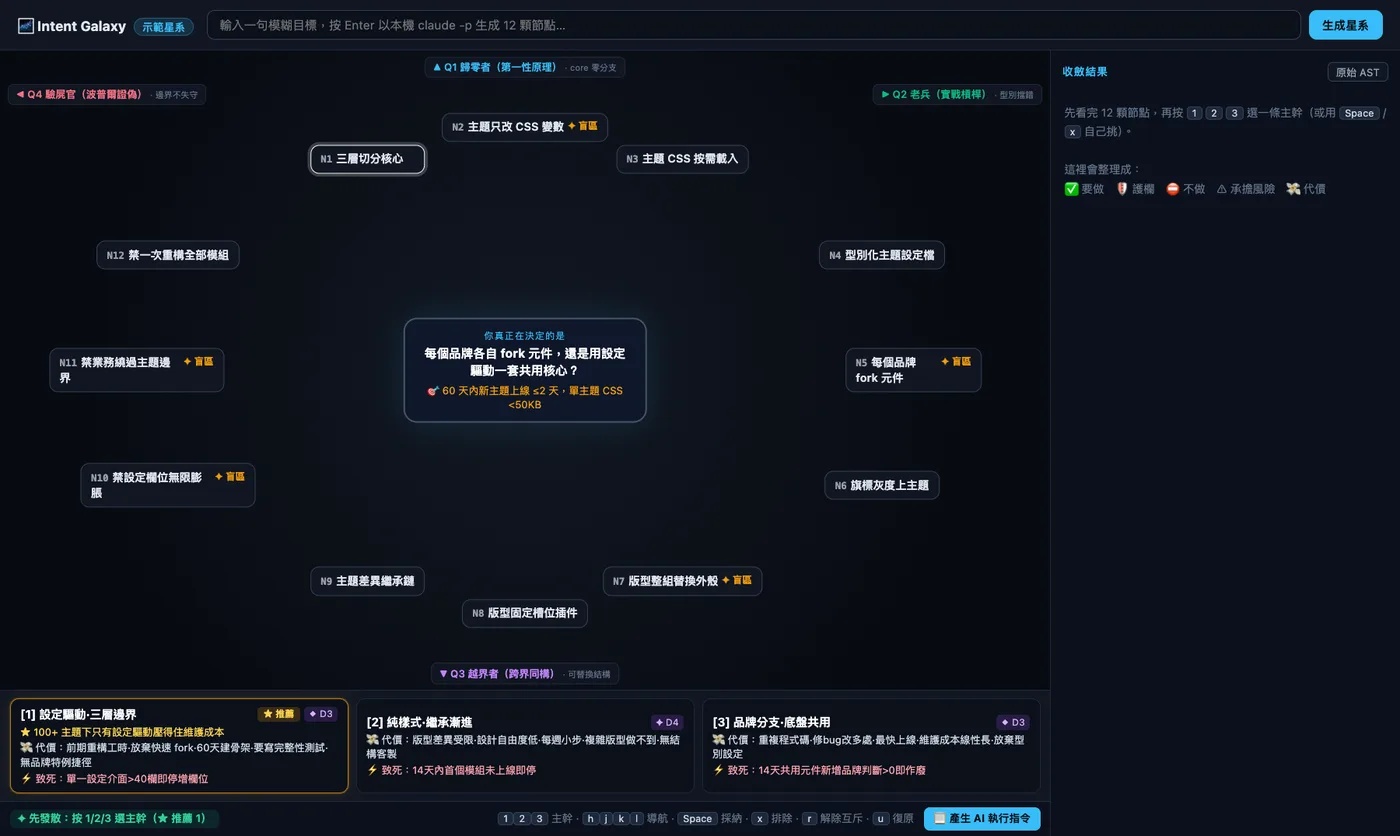
မရှင်းလင်းသော ရည်မှန်းချက်တစ်ခုကို ဂလက်ဆီမြေပုံအဖြစ် ပြောင်းပေးသည်: အရင်ဆုံး ဖြန့်ကျက်ပြီး မမြင်ရသောအပိုင်းများကို တွေ့ရှိ၊ ထို့နောက် ကီးဘုတ်ဖြင့် ပြန်ချုံ့ပြီး သတ်မှတ်ထားသော intent spec အဖြစ် ပြောင်းသည်။

Intent Galaxy မြင်ကွင်း: အဓိကမေးခွန်းတစ်ခု၊ quadrant 4 ခုရှိ node 12 ခုနှင့် မဟာဗျူဟာကတ် 3 ခု

AI က အဓိကမေးခွန်း တစ်ခု၊ ဆန့်ကျင်ဘက်ကျွမ်းကျင်သူ 4 ဦး၊ အတွေးနိုဒ် 12 ခုဖြင့် ဂလက်ဆီကို ထုတ်ပေးသည်။ ချုံ့ပြီးသောအခါ LLM မပါသော pure-function compiler က LOCKED INTENT AST ကို ထုတ်ပေးပြီး Claude Code သို့မဟုတ် AI chat ၏ input ထဲ ထည့်ပေးသည်။ dependency မရှိပါ။

  • သုံးနည်း: local CLI၊ MCP server (Claude Code၊ Codex၊ Gemini CLI နှင့် agy) နှင့် Chrome / Firefox extension များ။
  • sign in ဝင်ထားသော local CLI၊ Ollama သို့မဟုတ် API ပံ့ပိုးသူ တစ်ခုခုဖြင့် ထုတ်လုပ်သည်၊ local server သည် 127.0.0.1 ကိုသာ bind လုပ်ပြီး API key များသည် ဘရောက်ဇာသို့ မရောက်ပါ။
  • Kill-gate: lock လုပ်သောအခါ .intent.lock.json ကို ရေးသည်၊ 14 ရက်အကြာတွင် ဆက်စပ်သော path များကို ထိသည့် commit သည် ထို intent ကျန်ရှိနေသေးလားဟု အစီရင်ခံရမည်။

ထည့်သွင်းရန်

npx @stephen.taipei/intent-galaxy
claude mcp add intent-galaxy -- npx -y @stephen.taipei/intent-galaxy
CLI · ဘရောက်ဇာ extensionApache-2.0

Adorable Git Graph

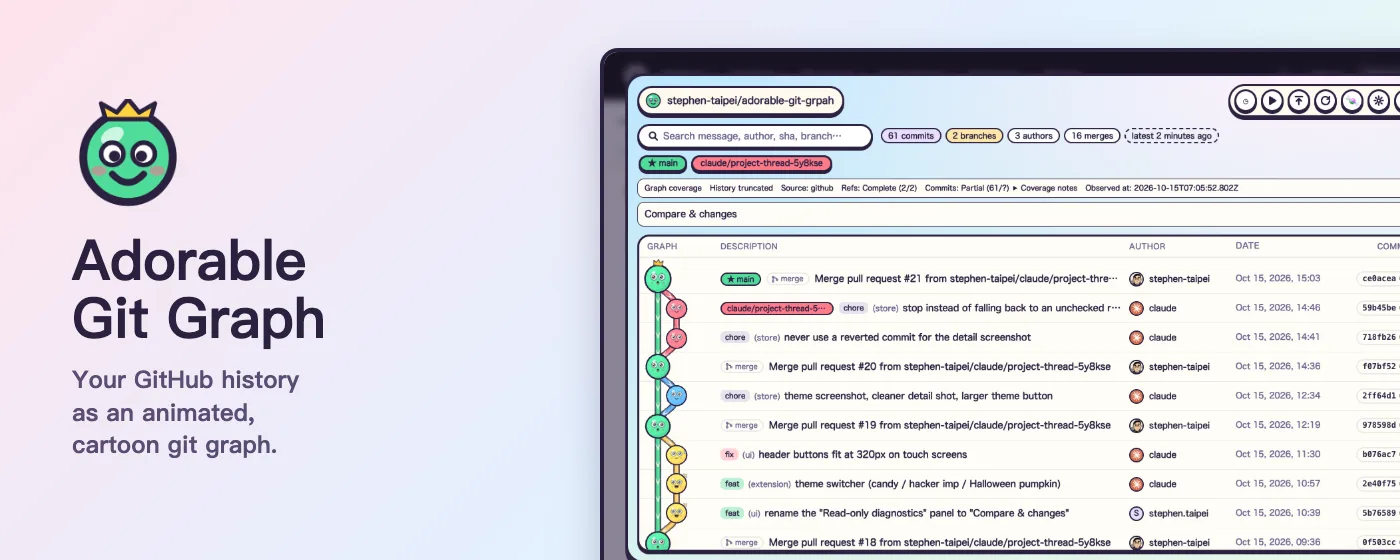
သင့် git ရာဇဝင်ကို scroll လုပ်နိုင်သော ကာတွန်းအဖြစ်: commit တိုင်းသည် မျက်နှာပါသော ဘောလုံး၊ branch တိုင်းသည် စီးဆင်းနေသော ပိုက်။

Adorable Git Graph စာရင်း: ကာတွန်း commit ဘောလုံးများ၊ branch label များ၊ ရေးသားသူ၊ ရက်စွဲနှင့် SHA

three.js ဖြင့်ဆွဲထားသော git log --graph ပုံစံစာရင်း၊ GitHub repo နှင့် local repo များအတွက်။ အစအဆုံး read-only ဖြစ်ပြီး analytics မရှိ၊ tracking မရှိ၊ ကိုယ်ပိုင် server မရှိပါ။

  • UI တစ်ခုတည်း ပုံစံ သုံးမျိုး: Chrome extension၊ Firefox add-on (store စစ်ဆေးမှု စောင့်ဆိုင်းနေ၊ source မှ load လုပ်နိုင်) နှင့် npx ဖြင့်စတင်သော local CLI။
  • CLI သည် တိုက်ရိုက်ပြင်ဆင်သည်: terminal တွင် commit လုပ်ခြင်း၊ branch ပြောင်းခြင်း သို့မဟုတ် fetch လုပ်ခြင်း ပြုလျှင် commit အသစ်များသည် refresh မလုပ်ဘဲ ပေါ်လာသည်။
  • ရှာဖွေခြင်း၊ branch ကို အာရုံစိုက်ခြင်း၊ commit အသေးစိတ်နှင့် base / head နှိုင်းယှဉ်ခြင်း၊ theme သုံးမျိုးတွင် တစ်မျိုးစီ light နှင့် dark ရှိပြီး interface ကို ဘာသာစကား 41 မျိုးဖြင့် သုံးနိုင်သည်။

ထည့်သွင်းရန်

npx @stephen.taipei/adorable-git-graph

ကျန်သော public repo များကို ဤနေရာတွင် ကြည့်နိုင်သည်: github.com/stephen-taipei